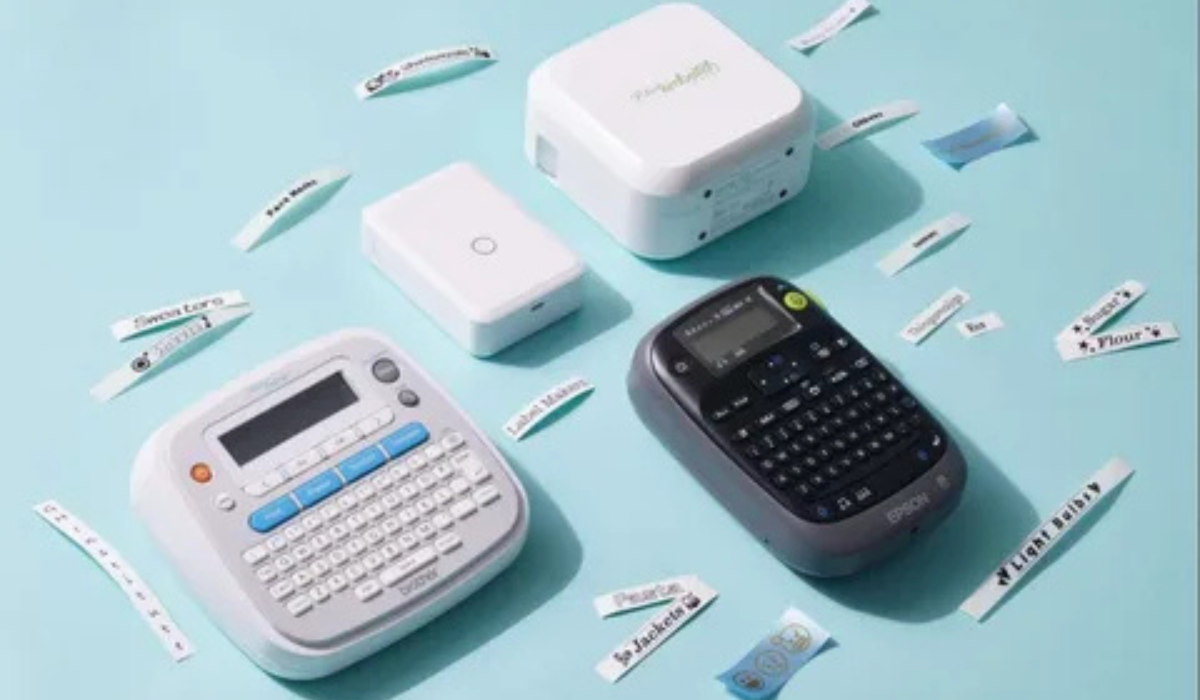
A messy pantry, overflowing storage boxes, and drawers full of things you can never find have something in common: you may know where everything belongs, but other people in your home might not. Even worse, you can spend an entire weekend organizing your house only to watch the clutter return a few weeks later.
A good label maker for home organization can help solve that problem. It gives containers, drawers, shelves, and storage boxes clear names, making it easier for everyone to find items and put them back where they belong.
But choosing the right machine is not as simple as buying the cheapest model or the one with the most features. Some label makers are perfect for everyday pantry organization, while others offer wider labels, smartphone connectivity, or more creative design options.
For most households, I would start by comparing the Brother P-touch PT-N25BT, Brother PT-D410, and Brother P-touch Cube Plus PT-P710BT. Each serves a different purpose, from straightforward household labeling to more customized designs.
Here is what you should know before choosing one, including the features worth paying for, the costs that are easy to overlook, and the mistakes that can make an otherwise good organization system difficult to maintain.
Quick Comparison: The Best Label Makers for Home Organization
| Label maker | Best suited for | Main advantage | Main limitation |
|---|---|---|---|
| Brother P-touch PT-N25BT | Everyday home organization | Physical keyboard plus Bluetooth app | Limited to 12 mm Btag tape |
| Brother PT-D410 | Home office, files, and storage | Physical keyboard, wider tape, and extensive formatting | No direct smartphone app connectivity |
| Brother P-touch Cube Plus PT-P710BT | Customized and decorative labels | Bluetooth and computer-based design options | More setup and potential tape waste |
These recommendations are based on published specifications and the available review research, not a personal hands-on test of all three machines. Availability, prices, and compatible supplies can vary by market.
1. Brother P-touch PT-N25BT: Best for Everyday Home Organization
If your main goal is to label pantry containers, bathroom drawers, stationery boxes, and everyday household storage, the Brother P-touch PT-N25BT is a practical place to start.
What makes this model interesting is its combination of a physical keyboard and Bluetooth connectivity. You can type directly on the machine or use a compatible smartphone app when you want additional design options.
That flexibility is useful for people who want straightforward labeling without giving up the option to create more personalized designs.
For more ways to keep toiletries and everyday essentials organized, explore these small bathroom organization ideas.
What makes it useful?
According to Brother’s official product specifications, the PT-N25BT supports:
- Labels up to 12 mm (approximately half an inch) wide.
- A built-in QWERTY keyboard and a display for previewing text.
- Bluetooth connectivity through Brother’s Design&Print 2 app.
- Multiple fonts, frames, and symbols.
- Storage for up to 10 frequently used labels.
- Six AAA batteries or a separately purchased AC adapter.
The machine uses Brother’s Btag tape system, so you should check tape compatibility before purchasing replacement supplies.
Where does it work best?
This label maker is particularly suitable for small, everyday labeling jobs.
You could use it to identify spice jars, bathroom storage, children’s stationery, craft boxes, or the contents of drawers. Short labels such as “Baking,” “Batteries,” “First Aid,” and “Cables” are easy to read and simple to reproduce.
The physical keyboard is also helpful when you do not want to open a phone app every time you need a quick label.
However, its maximum label width is an important limitation. If you regularly label large storage bins or need prominent, multi-line labels, a wider-format model will give you more flexibility.
Pros and cons
Pros
- Combines standalone typing with Bluetooth design options.
- Has a familiar QWERTY keyboard.
- Supports different colors of compatible tape.
- Saves frequently used labels for repeat printing.
Cons
- Limited to 12 mm tape.
- Requires compatible Brother Btag supplies.
- Batteries are not included, and the optional AC adapter adds another potential cost.
My recommendation: Choose the PT-N25BT if you want a straightforward household label maker with a little more flexibility than a basic keyboard-only model.
Pro tip: Before printing an entire set of pantry labels, create one test label and check its readability on the actual container. A label that looks good on a screen may be too small or low-contrast when viewed from across a shelf.
2. Brother PT-D410: Best for Home Offices and Larger Storage Labels
The Brother PT-D410 is worth considering if your organization projects go beyond small containers.
It is designed for people who want more control over label formatting, including homeowners organizing storage boxes, file folders, household paperwork, and equipment.
If you are organizing paperwork, cables, and equipment, these home office organization ideas can help you create a more functional workspace.
Its main advantage over a narrow-format label maker is the ability to print on wider tape.
Features that make a difference
Brother’s official PT-D410 specifications list several useful features:
- A physical QWERTY keyboard.
- Support for compatible TZe tapes up to 18 mm (approximately three-quarters of an inch) wide.
- Multiple fonts, symbols, and frames.
- A display that lets you preview your label before printing.
- USB connectivity for computer-based label design.
- Battery operation and an included AC adapter in the US PT-D410 package.
The PT-D410 is not a direct replacement for a Bluetooth printer. Its computer connectivity is useful for more advanced layouts, but you should not buy it expecting the same phone-based workflow as the PT-N25BT or Cube Plus.
Why wider labels can help
Imagine organizing a garage containing electrical supplies, seasonal decorations, gardening equipment, and household tools.
Small labels may work on compact containers, but larger boxes often benefit from wider text that can be read without moving them off a shelf.
The same applies to a home office. Labels such as “Tax Documents,” “Warranty Records,” and “Computer Accessories” can be easier to scan when the text is clear and appropriately sized.
The PT-D410 also offers more room for formatted labels than a half-inch-only machine. That does not mean every label should be large; it means you have more options when the job requires them.
Pros and cons
Pros
- Supports wider tape than the PT-N25BT.
- Provides extensive font, symbol, and frame options.
- Supports computer-based label design.
- Can operate using batteries or its included AC adapter in the US package.
Cons
- Does not provide direct smartphone app connectivity.
- Takes up more space than a compact handheld machine.
- Compatible tape costs should be considered before purchasing.
My recommendation: Pick the PT-D410 if you frequently organize filing cabinets, storage boxes, home-office equipment, or other items that benefit from wider labels.
Pro tip: Use the widest tape only when it improves readability. Small containers generally need small labels, while larger boxes can benefit from more prominent text. This keeps the organization system consistent without wasting supplies.
3. Brother P-touch Cube Plus PT-P710BT: Best for Customized Labels
Sometimes, you want more than plain text on a strip of tape. Perhaps you are organizing matching kitchen containers, creating a coordinated craft area, or labeling shelves in a newly renovated room.
In those situations, the Brother P-touch Cube Plus PT-P710BT is worth considering.
Unlike a traditional keyboard-based label maker, the Cube Plus connects to a compatible smartphone or computer so you can design labels using software.
What can it do?
Brother’s official PT-P710BT support and specifications confirm Bluetooth and USB connectivity.
The model supports Brother TZe tapes in widths up to 24 mm, depending on the compatible tape and regional product configuration. It is designed for people who want more freedom over the appearance and layout of their labels.
Depending on the software and device you use, you can create customized layouts, adjust typography, and use more elaborate designs than a simple handheld keyboard typically allows.
That makes the Cube Plus useful when presentation matters alongside organization.
Where does it make the biggest difference?
Consider a kitchen where you store flour, sugar, rice, pasta, and baking ingredients in matching containers.
A consistent label style can make those containers easier to identify while giving the shelf a more coordinated appearance.
The same approach works for craft supplies, gift organization, office folders, and decorative storage.
The important distinction is that customized labels should still be easy to read. Fancy fonts and decorative elements are useful only when they help the label fit your system rather than making the text harder to understand.
The downside: tape consumption
One practical concern raised in the supplied competitor review is the extra tape fed out around printed labels. The reviewer reported that the Cube Plus wasted tape during cutting.
That is a useful issue to investigate, but it should not be treated as a universal measurement of waste for every machine or setting.
Check the available cutting and printing options, and test a few labels before starting a large project. If you are printing dozens of short labels, even small amounts of unused tape can add up.
Pros and cons
Pros
- Bluetooth and USB connectivity.
- Supports compatible tape widths up to 24 mm.
- Offers more design flexibility than a basic keyboard-only machine.
- Useful for decorative labels and coordinated household storage.
Cons
- Requires a compatible phone or computer for its design workflow.
- Has more setup than a simple standalone label maker.
- Tape waste and replacement cartridge costs deserve attention.
My recommendation: Choose the Cube Plus if customized label design matters to you and you expect to use those features regularly. If you mainly need short labels for drawers and storage bins, a simpler model may be better value.
Pro tip: Create a reusable label template before starting a large organization project. Keeping the same font, text size, and alignment across containers saves time and gives the finished system a more consistent appearance.
4. What About Vinyl-Cutting Machines?
A vinyl-cutting machine is another option if you want highly customized labels rather than ordinary printed tape.
The Silhouette Cameo 3, mentioned in one of the supplied professional-organizer articles, is an example of a machine used for custom vinyl designs and other craft projects. However, it is an older model, so check current availability and software compatibility before considering it.
How is it different from a label maker?
A conventional label maker prints text or designs onto compatible label media. A vinyl cutter cuts shapes, letters, or designs from vinyl material that you can apply to a surface.
Vinyl lettering can be useful for decorative pantry containers, storage baskets, signs, and personalized projects. It also gives you greater control over the appearance of the finished design.
The trade-off is that you may need additional materials, design software, and time to prepare and apply each label.
For ordinary household organization, that extra work may not be worthwhile. For someone who regularly makes custom labels, signs, and craft projects, it may offer more creative freedom.
Pro tip: Decide whether you need a label that is quick to print and replace or a custom design that takes more preparation. That distinction can help you avoid buying a craft machine when a basic label maker would do the job.
5. How to Choose the Best Label Maker for Your Home
The best label maker is not necessarily the one with the most features. It is the one that makes your particular organization system easier to use and maintain.
Before purchasing anything, consider these factors.
Label width and readability
Start with the items you plan to label most often.
Narrow labels are generally suitable for spice jars, small containers, drawers, and cables. Wider labels can be more useful for storage boxes, file folders, and shelves that need to be identified from a distance.
Think about where the label will sit and how far away you will be when reading it.
A small label on a container at eye level may be perfectly clear. The same label on a large box stored high above your head may be harder to read.
Keyboard or smartphone app?
This decision can make a bigger difference than you might expect.
A keyboard-based label maker is convenient for quick jobs. You can type a word, preview it, and print without switching between devices.
A Bluetooth model is often a better fit if you want more design options, templates, symbols, or a smartphone-based workflow.
Neither option is automatically superior. If you rarely customize your labels, a simple keyboard can be all you need.
Tape compatibility and replacement costs
Do not compare machines using the purchase price alone.
A label maker may look affordable initially but require replacement supplies that cost more than you expected. Some models also accept only specific tape families or label formats.
Before buying, check:
- Which tape widths and materials the machine accepts.
- The price of compatible replacement cartridges or rolls.
- How much tape comes in each refill.
- Whether the supplies are readily available in your region.
- Whether you need specialty finishes or water-resistant labels.
These details matter because the machine is only one part of the ongoing cost.
Printing technology and durability
Many conventional Brother P-touch machines use thermal-transfer printing with compatible tape. Other portable label printers use direct-thermal printing, which relies on heat-sensitive label material rather than ink cartridges.
These technologies are different, and the labels should not be assumed to have identical durability.
For example, Brother’s PT-D410 product information describes compatible TZe tapes as resistant to water, abrasion, chemicals, and temperature extremes.
That is a claim about specific compatible supplies, not every label sold for every machine.
If you intend to label items exposed to moisture, sunlight, cleaning products, or frequent handling, check the manufacturer’s specifications for the exact tape you plan to use.
Power and portability
A portable label maker is convenient if you move between rooms or organize multiple areas in one session.
However, battery-powered models may require additional batteries, while rechargeable models need to be charged. Some desktop machines can also operate through an AC adapter.
Think about how you will actually use the device. If it will stay on a desk, portability may not matter much. If you will carry it from the kitchen to the garage and upstairs to the bedrooms, size and power become more relevant.
Print waste and cutting options
Some label makers feed extra tape before or after a label. The amount varies by model, label format, and settings.
If you regularly print many short labels, investigate whether the machine supports chain printing, adjustable margins, or other tape-saving options.
Do not assume that every model has these features or that a particular setting will eliminate all waste. Check the manual for your chosen machine and test it with the labels you intend to print.
6. How Much Should You Spend on a Home Label Maker?
Your budget should reflect how frequently you plan to label items and how much customization you need.
Rather than choosing a price range without checking local availability, compare the total cost of the machine, compatible supplies, and any accessories you need.
For occasional household use
If you only need labels for pantry containers, drawers, and a few storage boxes, start with a straightforward model.
You probably do not need extensive software features or the ability to print elaborate designs. A physical keyboard and a few readable formatting options may be enough.
For frequent organizing projects
If you regularly reorganize closets, storage areas, household paperwork, or several rooms at once, wider tape and additional formatting options may justify spending more.
Consider how much time the machine will save and whether replacement tape is easy to purchase.
For decorative projects
If you enjoy coordinated labels, personalized gifts, or craft projects, smartphone design tools or a vinyl-cutting machine may be worth the extra expense.
However, avoid paying for creative features you will rarely use.
Pro tip: Before buying, write down five things you expect to label. Compare those items against the machine’s maximum label width, compatible supplies, and design options. This simple exercise can help you identify the features that matter most.
7. A Practical Home Organization Example
Imagine a household with an overflowing pantry, a crowded bathroom cabinet, and a collection of unmarked storage boxes.
The family decides to organize everything over a weekend.
They begin by sorting items into categories, removing things they no longer need, and assigning a specific place to each remaining group. Only then do they print labels.
For the pantry, they use short labels such as “Rice,” “Pasta,” and “Baking.” In the bathroom, they label drawers by category rather than listing every individual item. For the storage area, they use larger, more visible labels that identify the contents of each box.
They also agree on a simple rule: whenever something is removed, it goes back to its labeled location.
The label maker helps, but the organization system does the real work. Labels alone cannot compensate for containers that are too full, categories that are confusing, or items that have no designated home.
This is why I would organize first and print second. You are less likely to waste tape making labels for a system you later change.
8. Common Label-Making Mistakes to Avoid
Printing labels before sorting
If you print labels before deciding what belongs in each space, you may end up with labels that no longer match the contents.
Sort first, choose categories second, and print last.
Using too many categories
A drawer does not necessarily need a separate label for every object inside it. Sometimes one clear category is enough.
For example, a single “Office Supplies” label may work better than separate labels for pens, pencils, paper clips, and sticky notes when those items share the same container.
Choosing decorative fonts over readability
A beautiful label is not helpful if nobody can read it quickly.
Use simple lettering for frequently accessed storage and reserve more decorative designs for places where appearance is a priority.
Ignoring the surface
Not every adhesive works equally well on every surface. Dust, grease, moisture, texture, and temperature can affect how well a label sticks.
Clean and dry the surface according to the container and label manufacturer’s instructions before applying a new label.
Forgetting replacement supplies
Running out of compatible tape halfway through a project can interrupt the process.
Before starting a large labeling session, check that you have enough compatible supplies. Keep the packaging or product number so you can reorder the correct refill.
9. Frequently Asked Questions
What is the best label maker for home organization?
The best option depends on your needs. The Brother PT-N25BT suits everyday household labeling, the PT-D410 is useful for wider labels and home-office organization, and the P-touch Cube Plus PT-P710BT offers more customization through compatible phone and computer workflows.
Are Bluetooth label makers better than traditional label makers?
Not for everyone. Bluetooth models can provide additional templates, fonts, and design controls. Traditional keyboard-based models are often more convenient when you simply want to type and print a short label.
Are thermal label makers inkless?
Direct-thermal printers use heat-sensitive label material and do not need ink cartridges or toner. Thermal-transfer printers use heat to transfer material from a ribbon onto compatible labels or tape. Check the printing technology of the particular model before buying.
Are label-maker labels waterproof?
Some compatible label materials are designed to resist water, but you should not assume that every label is waterproof. Check the manufacturer’s specifications for the exact tape or roll, especially if labels will be exposed to frequent moisture or cleaning.
What size labels are best for pantry containers?
Narrow labels are usually suitable for small spice jars and containers. Wider labels can help with large canisters and storage bins. The best size depends on the container, the amount of text, and the distance from which you need to read it.
How can I reduce label tape waste?
Look for models with suitable margin or chain-printing options, where supported. Group similar printing jobs together, preview labels before printing, and consult the manual for the machine’s cutting and margin settings.
Can I use a label maker for more than home organization?
Yes. Depending on the model and compatible media, label makers can be used for home-office files, cables, school supplies, craft materials, inventory, and other everyday labeling tasks.
Final Verdict: Which Label Maker Should You Choose?
The best label maker for home organization is the one that fits your everyday habits rather than the one with the longest feature list.
- Choose the Brother PT-N25BT if you want a straightforward household label maker with both a physical keyboard and Bluetooth design options.
- Choose the Brother PT-D410 if wider labels, detailed formatting, and home-office organization are your priorities.
- Choose the Brother P-touch Cube Plus PT-P710BT if you want more creative control over customized labels.
- Consider a vinyl-cutting machine if your projects involve custom lettering, decorative designs, and crafts beyond ordinary printed labels.
My final advice is to build a simple organization system before spending money on equipment. Decide where your belongings belong, use clear category names, and choose label sizes that are easy to read.
A label maker can make your home easier to maintain, but consistency is what keeps the system useful long after the first weekend of organizing.